You think you're taking care of your iPhone. Case? Check. Screen protector? Check. You're careful not to drop it. But five mistakes are slowly killing your phone from the inside — and you don't even realize it's happening until it's too late.
Every day, thousands of iPhone users worldwide repeat the same habits that drastically shorten their device's lifespan. From wrong charging practices to poor software maintenance, these seemingly innocent iPhone mistakes cost big. Especially now in 2026, when iPhones have become more powerful but also more sensitive to specific types of abuse.
Let's break down these silent killers. And more importantly — how to stop them before they destroy your phone.
📖 Read more: 5 Mistakes That Are Killing Your iPhone Battery
🔋 The Cable of Destruction: Why Cheap Gets Expensive
I know what you're thinking. "What's the difference between a $5 cable and a $30 one?" Massive, as it turns out. Non-certified cables (without MFI certification) are your battery's number one enemy.
These cheap knockoffs from gas stations or sketchy websites lack essential safety controls. Result? Unstable current that tortures your battery. Overheating during charging. And in the worst case, permanent damage to your charging port.
⚡ How to Spot a Certified Cable
- Has the "Made for iPhone" (MFI) logo on packaging
- Usually costs $15-20 or more
- Sold through official stores or authorized resellers
- Apple provides verification tools on their website
An iFixit study showed that non-certified cables can reduce battery lifespan by up to 40% within one year. Was saving $25 really worth it?
🌡️ Thermal Hell: When Your iPhone Cooks Itself Alive
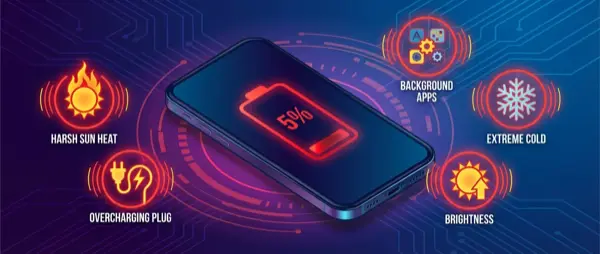
We've all done it. Left the iPhone charging on the car dashboard under blazing sun. Or tucked it under a pillow overnight. Big mistake.
Lithium batteries in iPhones have an ideal temperature range: 61-72°F (16-22°C). Above 95°F (35°C), the battery's chemical composition starts permanently degrading. It's like putting your phone in a slow oven.
iOS has overheating protection, but it's not magic. If you see "iPhone needs to cool down," damage has already occurred.
The Worst Charging Spots
- Car dashboard: Can reach 158°F (70°C) in summer
- Under pillows: Traps heat, prevents iPhone from "breathing"
- Next to radiators: Even in winter, direct heat is destructive
- Inside thick cases: Some cases block heat dissipation
📱 Playing with Fire: Gaming While Charging
Call of Duty Mobile while your iPhone is plugged in? Bad idea. Very bad idea.
When you use your iPhone intensively during charging, you create double stress. The battery heats up from charging AND from usage. The processor works at its limits. The result is temperatures that can exceed 113°F (45°C).
But it's not just games. The same applies to video streaming, FaceTime calls, even intensive photo editing. If you must use your iPhone, unplug it first.
💀 The Deadly 0%: Why "Let It Die Completely" Is a Myth
Old advice from the nickel battery era. Today? Pure destruction.
Modern lithium batteries hate extremes. Every time you let your iPhone drop below 20%, you cause microscopic damage to battery cells. At 0%? The damage is even worse. Each battery "death" reduces its total capacity by 1-2%.
The sweet spot? Keep your battery between 20% and 80%. Yes, it means more frequent charging. But your battery will last twice as long.
"Users who systematically let their iPhone 'die' lose about 20% of battery capacity in the first year."
Battery University Research, 2025
🛡️ The Invisible Threat: Old iOS and Security Holes
The last but equally critical iPhone mistake isn't about hardware. It's the software you're ignoring.
Every iOS update doesn't just bring new features. It closes critical security vulnerabilities. The recent DarkSword exploit discovered by Google specifically targets older iPhones with outdated software. It can steal all your data with a single click on a malicious link.
Apple recently released special updates even for iPhones that have lost support — from iPhone 6S to iPhone X. If you haven't installed them, your phone is an open door for hackers.
What to Do If You Have an Old iPhone
If your iPhone can't install the latest iOS:
- Enable Lockdown Mode (Settings → Privacy & Security → Lockdown Mode)
- Avoid unknown WiFi networks and suspicious links
- Seriously consider upgrading — your security is worth more than $300-400
Yes, I get it. "It works fine, why change it?" But an iPhone 6 in 2026 is like driving a car without seatbelts and airbags. Technically it moves, but you're exposed.
Pro Tip
If you must keep an old iPhone, at least use a VPN and avoid mobile banking or sensitive apps.
Battery Hack
Enable Optimized Battery Charging — iOS will learn your habits and protect the battery automatically.
🎯 Frequently Asked Questions
Can I leave my iPhone plugged in all night?
Technically yes, iOS has overcharge protection. But constant micro-charges from 99% to 100% stress the battery. Better to unplug when it hits 80-90% if you can.
Do wireless chargers damage the battery?
They generate more heat than cables, so yes, they can slightly accelerate wear. Use them sparingly and make sure they're Qi-certified.
How often should I restart my iPhone?
Once a week is enough to clear RAM and close background processes that drain battery unnecessarily.
The truth is simple but harsh. Most iPhones don't "die" from natural causes — we kill them with our bad habits. The good news? Now that you know these iPhone mistakes, you can stop them. Your iPhone will thank you with years of extra life and performance.