Navigate trails without your phone
Strava, Komoot, WorkOutDoors, AllTrails — the top outdoor apps give you offline maps and turn-by-turn navigation right on your Apple Watch. Learn how to get the most out of them.
📖 Read more: Apple Watch: 1 in 4 Smartwatches Worldwide
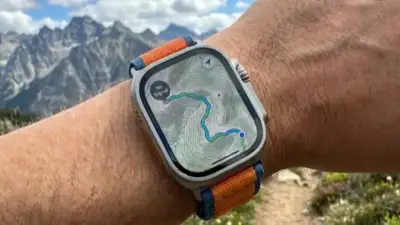
The idea is simple but powerful: head out for a hike, bike ride, or run on an unfamiliar trail — without bringing your iPhone. On your wrist, your Apple Watch displays a map, gives you turn-by-turn directions, records your activity, and guides you back safely. A few years ago this was impossible — today it's a reality thanks to third-party apps and the improved battery life of newer Apple Watch models.
In this comprehensive guide, we examine the four best apps for offline navigation on Apple Watch, the pros and cons of each, how to set them up, and which one best suits your needs.
The 4 best apps
Strava
The most popular app for running and cycling. The Apple Watch app records activities, displays Live Segments, and offers Beacon for real-time location sharing. Routes (Premium) display the route on your watch.
Komoot
Specializes in hiking and off-road cycling. Offers turn-by-turn navigation on Apple Watch, automatic route planning, and offline map downloads for navigating in areas with no signal.
WorkOutDoors
The most powerful workout app for Apple Watch. Full offline OpenStreetMap vector maps, 800+ data fields, turn-by-turn navigation, topographic data, climb detection. Rated 4.7/5 on the App Store.
AllTrails
The world's largest trail database (400K+). The Apple Watch app displays a map, breadcrumb trail, off-trail alerts, and detailed elevation data in real time.
Detailed feature comparison
Each app excels in different areas. Let's take a detailed look:
| Feature | Strava | Komoot | WorkOutDoors | AllTrails |
|---|---|---|---|---|
| Offline maps | ⚠️ Routes only | ✅ Full | ✅ Vector maps | ✅ AllTrails+ |
| Turn-by-turn navigation | ⚠️ Basic | ✅ Full | ✅ Full + bend detect | ✅ Full |
| Topographic/contours | ❌ | ✅ | ✅ + hill shading | ✅ |
| Without iPhone | ✅ GPS recording | ✅ Fully | ✅ Fully | ✅ Fully |
| Import GPX/TCX | ✅ Routes | ✅ | ✅ GPX/TCX/FIT | ✅ GPX |
| Live Segments | ✅ Premium | ❌ | ❌ | ❌ |
| Beacon (location sharing) | ✅ Premium | ✅ Premium | ❌ | ✅ AllTrails+ |
| Climb detection | ❌ | ✅ | ✅ + descent | ✅ |
| Off-route alert | ❌ | ✅ | ✅ | ✅ |
| Data fields on watch | ~10 | ~15 | 800+ | ~12 |
| Community | ⭐⭐⭐⭐⭐ | ⭐⭐⭐⭐ | ⭐⭐⭐ | ⭐⭐⭐⭐⭐ |
| Price (full) | €11.99/month | €4.99/month | €8.99 one-time | €35.99/year |
Strava: The queen of community
Strava needs no introduction — it's the most popular platform for runners and cyclists worldwide, with over 120 million athletes. The Apple Watch app lets you record activities directly from your wrist, without an iPhone.
What you can do on Apple Watch
Routes (Premium)
Plan a route in the Strava app or website, sync it to your watch, and see the navigation line on your wrist. It's not a full map, but the line keeps you on the right track.
Live Segments
Starting a Segment? Your watch shows in real time how you compare to your personal best or the KOM/QOM. Haptic feedback at the start and end of each segment.
Beacon
Share your live location with friends or family during an activity. Ideal for safety on remote trails. Works via Cellular or iPhone.
Metrics
Distance, pace, heart rate, elevation, cadence. Auto-sync to your Strava feed as soon as you finish.
✅ Strava Pros
- Largest athlete community worldwide
- Live Segments — unique feature
- Real-time safety Beacon
- Automatic activity upload
- Excellent data analysis in the phone app
❌ Strava Cons
- No full offline map — route line only
- Most features require Premium
- €11.99/month — expensive subscription
- Limited data fields on the watch
- No topographic map support
Komoot: The queen of the trail
Komoot is the app built from the ground up for outdoor activities — hiking, mountaineering, mountain biking, gravel cycling. It stands out for its automatic route planning based on activity type (the app knows which trails are suitable for MTB vs hiking, for example) and its full offline map data.
Turn-by-turn on Apple Watch
Komoot was one of the first apps to offer true turn-by-turn navigation on Apple Watch. Here's how it works:
Plan your route on the phone
Use the Komoot app or website. Choose the activity type (hiking, MTB, gravel), starting point, and destination. Komoot automatically generates the optimal route.
Download the offline map (Premium)
In Komoot's settings, download the map packs for the regions you're interested in. The data is stored on the iPhone and transferred to the Watch.
Sync with Apple Watch
Open the Komoot app on Apple Watch. Your planned route appears automatically. Tap Start Navigation.
Follow the directions
You see turn arrows, distance to the next turn, and haptic taps every time you approach a direction change. No need to keep looking — the haptics alert you.
✅ Komoot Pros
- Excellent outdoor route planning
- Full turn-by-turn with haptic feedback
- Highlights & points of interest along the route
- More affordable than Strava (€4.99/month)
- Strong outdoor community in Europe
❌ Komoot Cons
- Offline maps only with Premium
- Fewer training metrics than Strava
- Smaller community in Greece
- No Live Segments
- Greek trails less thoroughly covered
WorkOutDoors: The hidden powerhouse
If you ask on any Apple Watch forum what the best map app is for the watch, the answer will almost always be: WorkOutDoors. This indie app, rated 4.7/5 on the App Store, offers capabilities that surpass every competitor — and without a subscription, no less.
Why WorkOutDoors stands out
With a single €8.99 payment, you get: full OpenStreetMap vector maps with topographic contours and hill shading, 800+ customizable data fields, turn-by-turn navigation (even with automatic “bend detection” if the route has no directions), off-route alerts, climb/descent detection, waypoints, export to Strava, and much more. No subscription, no upsell.
Full offline maps
Unlike most apps, WorkOutDoors uses vector maps from OpenStreetMap, stored directly on the Apple Watch itself. This means:
Smooth pan & zoom
The map scrolls smoothly, just like a phone app. Zoom in/out with the Digital Crown. The map rotates according to the compass.
Topographic data
Contour lines and hill shading are displayed on the map. See ascents, descents, and elevation changes without a connection.
Breadcrumb trail
Your entire route is displayed as a line on the map. If you get lost, follow the line back. A red compass always points north, a green compass points to the starting point.
Waypoints
Create points of interest (waypoints) and see compass + distance to them. Ideal for summits, shelters, or water sources.
🏆 Best Value: WorkOutDoors
For a one-time €8.99, you get the most complete mapping and navigation capabilities on Apple Watch. If you need offline maps without a monthly cost, this is the best choice.
AllTrails: The trail database
AllTrails stands out from the other apps for one reason: it has the largest trail database in the world — over 400,000 trails in 190+ countries. In Greece, coverage is continually improving, especially for popular hiking trails (E4, Samaria Gorge, Mount Olympus, etc.).
400K+ trails
Find trails near you, filter by difficulty, length, elevation, and user ratings. Download one to your Watch.
Off-trail alerts
If you stray from the trail, you get an alert. Critical on forest trails or in fog where visibility is limited.
Lifeline (sharing)
Share your location in real time with friends/family. If you stop moving, your contacts are automatically notified.
📖 Read more: Apple Watch Bands 2026: Top Picks
How to download offline maps
The process differs by app, but the general principle is the same: download the maps to your iPhone, and they're transferred to your Apple Watch before you head out.
WorkOutDoors: Automatic download
Maps download automatically as you navigate. You can also open a region in the iPhone app and tap “Download to Watch.” Maps are stored locally on the watch.
Komoot: Map Regions
In Komoot settings (Premium), select Offline Maps → Download Region. Choose the regions you need (e.g., “Attica,” “Crete”). Data is automatically transferred to the Watch during pairing.
AllTrails: Trail Downloads
Find a trail in the AllTrails app, tap Download (AllTrails+). The map for that specific trail is saved offline. Sync with your Watch before you leave.
Strava: Routes sync
Create or save a Route in Strava (Premium). Go to Strava Watch settings → Routes → select which routes to sync. The navigation line appears offline.
Pro Tip: Battery
Using GPS + offline maps drains significant battery. Before heading out, charge to 100%. On longer hikes, enable Low Power Mode — most apps continue to work normally. On Ultra 3, battery life reaches 17 hours of GPS in normal mode.
Battery life during use
Battery is a critical factor for outdoor activities. Let's see how long each Apple Watch lasts with active GPS recording + offline maps:
Which app fits each scenario
City running
Segments, leaderboards, running community. Strava is the best for urban running with a competitive edge.
Mountain hiking
Offline maps, topographic data, off-route alerts. AllTrails if you want community trails, WorkOutDoors if you want maximum customization.
Mountain Biking
Komoot knows which trails are suitable for MTB. Turn-by-turn + climb detection = the ideal combo for off-road.
Road Cycling
Strava for segments & community, Komoot for planning new routes. Many cyclists use both.
Multi-day hiking
With 36 hours of GPS in Low Power Mode and full offline maps, Ultra 3 + WorkOutDoors is the ultimate combo for thru-hiking.
Trail Running
Strava if you want leaderboards on popular trails. WorkOutDoors if you want map + climb detection + elevation profile on unfamiliar trails.
Offline navigation on Greek trails
Greece has outstanding hiking trails, but many of them are in areas with no cell service. This makes offline maps essential, not a luxury. Here are some examples:
Mount Olympus — E4
The route Litochoro → Prionia → Spilios Agapitos Refuge → Mytikas. Offline maps with elevation profiles are critical, especially in fog.
Samaria Gorge
The Samaria Gorge (16 km) has no signal for much of the route. With offline maps, you can see where you are at all times.
Vikos — Zagori
The Zagori villages have outstanding trails but unreliable signal. Turn-by-turn navigation on your wrist completely transforms the experience.
Mani — Taygetus
The mountainous Mani region and Mount Taygetus (2,407m) offer alpine scenery but no reliable signal. Offline maps + waypoints = safety.
Important for Greece
Trail coverage on OpenStreetMap (used by WorkOutDoors) is generally good for popular Greek trails, especially the major routes (E4, E6, O2). AllTrails has growing coverage in Crete, the Ionian Islands, and the Cyclades. Komoot excels in Zagori, Pelion, and Olympus, thanks to its active European community.
Cellular vs GPS-only: What do you need?
A common question: do you need an Apple Watch with Cellular for offline navigation? The short answer: not necessarily.
GPS-only is enough for
Offline maps, turn-by-turn navigation, GPS recording, off-route alerts, waypoints. All of these work with GPS alone — no Cellular or iPhone needed.
Cellular is needed for
Beacon/Lifeline (live location to others), automatic activity upload, SOS emergency calls, real-time Strava Segments. If safety is a priority, Cellular is worth it.
Frequently asked questions
Conclusion
The era of needing a dedicated GPS outdoor watch (Garmin, Suunto) or your phone for trail navigation is coming to an end. With the right apps, Apple Watch becomes a complete outdoor companion — with offline maps, turn-by-turn navigation, and sufficient battery for most activities.
Our recommendation:
For offline maps
The undisputed king. Vector maps, topographic data, 800+ metrics, turn-by-turn, no subscription. One-time purchase, lifetime value.
For community & training
Segments, leaderboards, Beacon. Even if you use another app for navigation, Strava is the ideal social platform for athletes.
For route planning
If you want automatic optimal route planning by activity type, Komoot is unbeatable. Especially for cycling and hiking in Europe.
Strap on. Charge up. Head out.
Download the maps, charge your watch, and explore without your phone. Nature awaits — now with navigation on your wrist.