Watch faces are the heart of the Apple Watch experience. With watchOS 26, Apple delivers new faces, improved customization options, and more powerful complications than ever before. In this guide, you will discover the best faces for every use case — from fitness and work to sleep and aesthetics — and learn how to get the absolute most out of them.
📖 Read more: Apple Watch Ultra 3 Black Titanium: Review After Daily Use
New Watch Faces in watchOS 26
Flux
Flux is an entirely new dynamic watch face that transforms in real time. It uses fluid color movements that change according to the time of day. In the morning, it displays warm tones, while at night it transitions to deep purples and blues. It supports < 4 complications in the corners and is ideal for anyone who wants a face that feels alive and constantly evolving throughout the day.
Snoopy and Woodstock
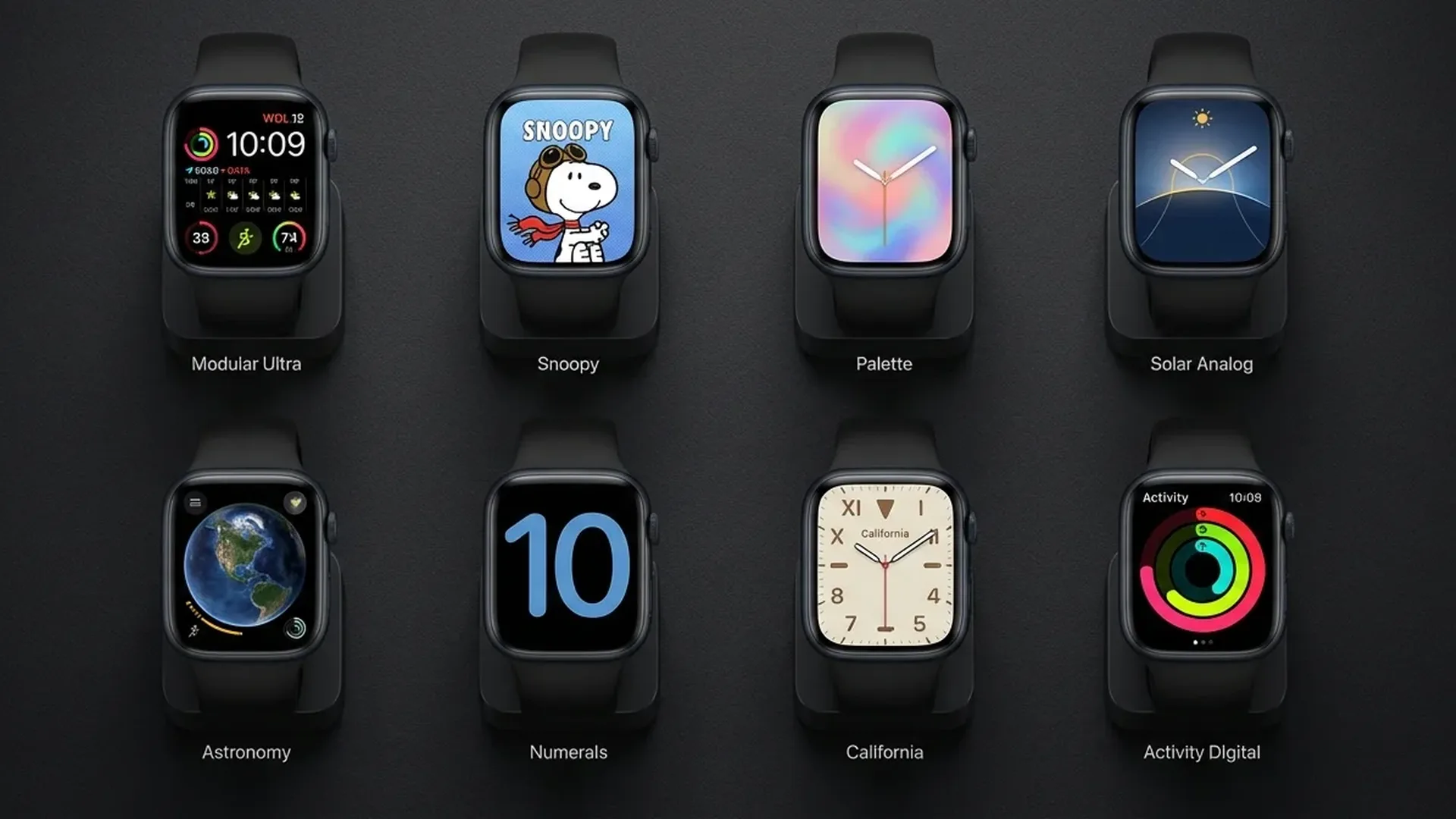
The beloved Snoopy face returns in watchOS 26 with new animations and delightful interactions. Snoopy and Woodstock react to the weather, your steps, and the time of day. If it is raining, you see Snoopy with an umbrella. If you close your Activity rings, they celebrate with you in a charming animation. It is as cute as it is functional, with support for < 2 complications.
Palette
Palette creates a unique artistic effect with layers of shifting colors. Every hour, the colors subtly shift, creating the feeling of a living painting on your wrist. It features three color palette variations and supports time display in both digital and analog formats, giving you flexibility in how you read the time.
Nike Globe
Exclusive to Nike Edition models, Nike Globe displays a three-dimensional globe that slowly rotates on your wrist. Running data from the worldwide Nike Run Club community appears in real time across the surface of the globe. It is a stunning face that perfectly combines aesthetics with athletic spirit and community connection.
Quick Tip
Long-press on the watch face to switch faces quickly. Swipe left or right to cycle through your saved faces. You can have up to < 50 active faces stored on your Apple Watch at the same time.
Best Faces for Fitness
Activity Digital
Ideal for anyone who wants to see their Activity ring progress at a glance. It displays calories, exercise minutes, stand hours, and steps in a clean digital format. It supports < 4 additional complications for workout data, heart rate, and other fitness metrics you want to track throughout the day.
Activity Analog
The analog version of the Activity face combines classic watch aesthetics with the three Activity rings wrapped around traditional watch hands. Perfect for those who prefer a traditional look but do not want to miss their fitness data during the day. The rings provide constant motivation without overwhelming the design.
Nike Hybrid
Nike Hybrid combines analog and digital display with bold typography that stands out on the wrist. It shows large numbers for the time alongside core fitness data. Its appearance is sporty and modern, making it ideal for athletes and movement enthusiasts who want a face with personality.
Best Faces for Minimal Aesthetics
If you prefer a clean, elegant appearance, there are several excellent options in watchOS 26. Simple provides a clear time display without unnecessary elements, while Numerals Duo shows two large digits in striking typography. Contour stands out with numbers that follow the curve of the display, creating a sense of three-dimensional depth.
📖 Read more: Apple Watch Ultra 3 vs Galaxy Watch Ultra: Full Comparison
For an even more minimal result, try Typograph, which uses ancient numerals in a classical serif font. It is designed for those who treat their Apple Watch as jewelry, looking particularly stunning on models with ceramic or titanium cases that complement the refined aesthetic.
Best Faces with Multiple Complications
Infograph remains the undisputed king of complications. It supports up to < 8 complications simultaneously, allowing you to see calendar, weather, heart rate, battery, Activity rings, UV index, sunset time, and timer — all on a single screen. Infograph Modular offers larger widgets in a modular layout, ideal for detailed data display and at-a-glance information.
Metropolitan, first introduced in watchOS 9, combines elegant typography with practical complications. The numbers change size depending on the angle of your wrist, creating an interactive visual effect that adds a touch of sophistication to everyday use.
What Are Complications?
Complications are small widgets that sit on the watch face and display information without opening an app. They show data such as weather, calendar events, Activity rings, heart rate, and much more. Each watch face supports a different number and arrangement of complications.
Photo Face and Portrait Face
The Photo and Portrait faces let you use your own photographs as watch faces. Photo face displays a single photo or cycles through multiple images each time you raise your wrist. Portrait face uses the iPhone portrait mode to create a depth effect where the time appears behind the subject of the photo.
For best results with Portrait face, use photos of pets or people with a clean background. Avoid overly bright images because the time can become difficult to read. You can adjust the position and zoom directly from the Watch app on iPhone to get the perfect framing.
Astronomy Face for Space Lovers
The Astronomy face displays the Earth, Moon, or the entire solar system in real time. By rotating the Digital Crown, you can view moon phases, planet positions, and the position of the sun relative to your location. In watchOS 26, the face has been upgraded with improved graphics and more accurate astronomical data.
📖 Read more: Apple Watch Ultra vs Garmin Fenix 8: For Athletes
Watch Face Sharing
With Face Sharing, you can share your favorite watch faces with friends and family. Send a watch face via Messages, Mail, or AirDrop. The recipient can install it with a single tap and then customize the complications to their own preferences. You can also find community faces on websites and forums dedicated to Apple Watch customization.
For an even more personalized experience, create different faces for different occasions. A minimal face for work, one loaded with fitness complications for the gym, a simple one for sleep mode, and a colorful one for the weekend. Switching between them is instant with a swipe from the watch face.
Top 10 Watch Face Recommendations
- Infograph: For maximum information — < 8 complications, ideal for power users
- Flux: For stunning aesthetics — dynamic colors that captivate attention
- Modular: For flexibility — large widgets, easy reading at a glance
- Activity Digital: For fitness lovers — complete activity data on screen
- Contour: For minimal elegance — numbers that curve with the display edge
- Snoopy: For fun — adorable and interactive throughout the day
- Portrait: For a personal touch — your own photos with depth effect
- California: For classic aesthetics — mixed numerals, retro style charm
- Metropolitan: For sophistication — interactive typography that responds to movement
- Astronomy: For space lovers — real-time planet and moon tracking
Frequently Asked Questions
How many watch faces can I have at the same time?
You can store up to < 50 watch faces on your Apple Watch. Switch between them by swiping left or right on the current face, or manage them through the Watch app on your iPhone.
Can I download third-party watch faces?
Apple does not support third-party watch faces. However, you can use community configurations through Face Sharing, where someone shares a customized Apple face with their preferred complication setup and color choices.
Do complications drain battery?
Complications refresh data periodically, so many active complications can slightly affect battery life. For better battery performance, consider using < 4 complications instead of the maximum < 8 available on faces like Infograph.
How do I share a watch face?
Long-press on the face, tap the share button, and send via Messages, Mail, or AirDrop. The recipient will receive the face with all your settings and complication configurations included.
Which face is best for Always-On Display?
Infograph, Modular, and Contour work exceptionally well with Always-On Display because they use dark backgrounds that conserve energy. Avoid bright faces with many animations if you want to maximize battery life throughout the day.
Can faces change automatically?
Yes, using the Focus feature in watchOS 26. You can assign a different face to each Focus mode (work, fitness, sleep), and they will switch automatically when the corresponding Focus activates on your devices.