📖 Read more: Apple Watch Swimming: What It Tracks in Water
Indoor and Outdoor Cycling Workouts
The Workout app on Apple Watch offers two distinct cycling workout types. Outdoor Cycling makes full use of the GPS sensor for route tracking, while Indoor Cycling is designed for stationary bikes and smart trainers. Each type records different data based on what the environment allows.
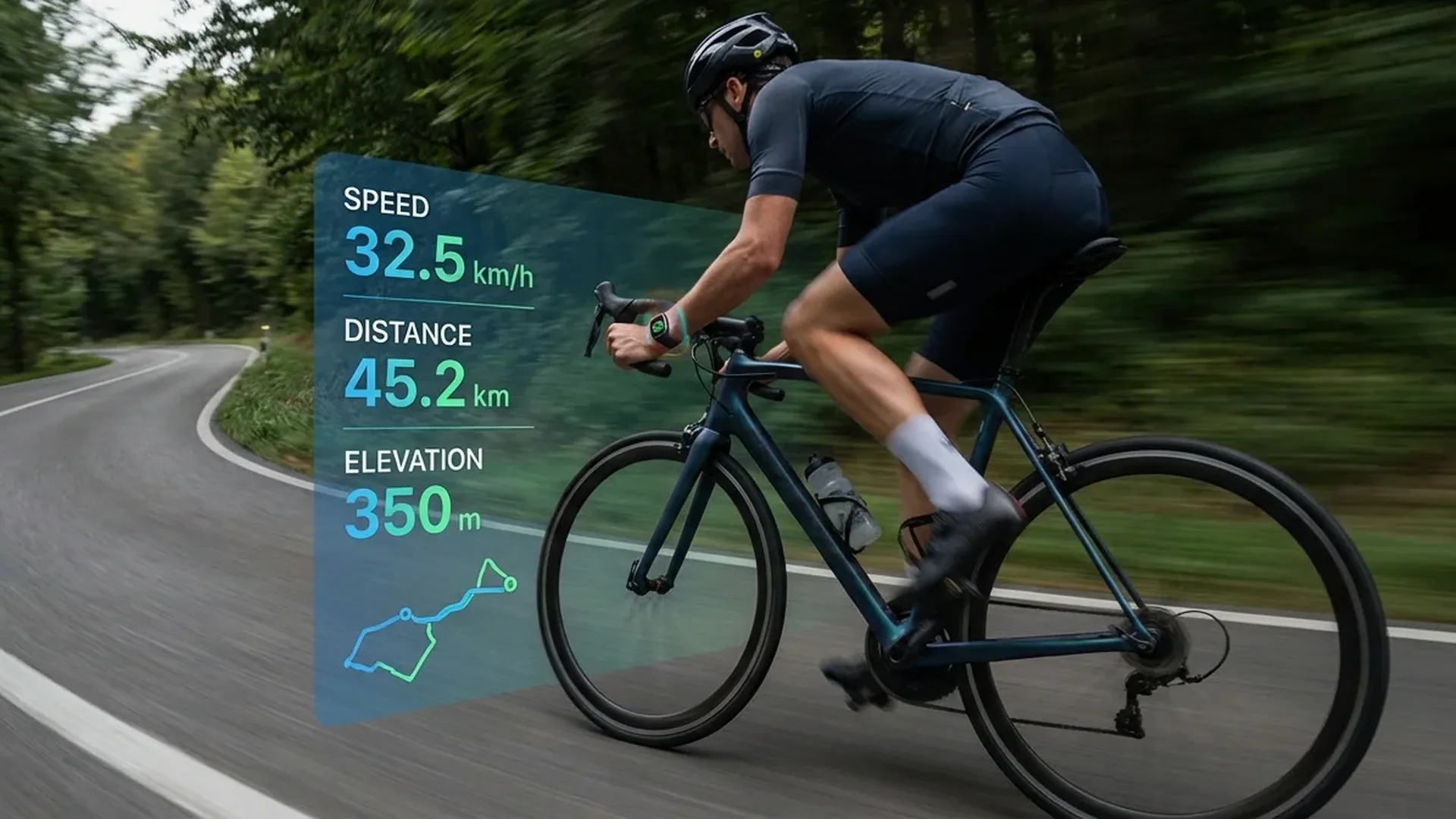
In Outdoor Cycling, the watch automatically activates GPS and begins mapping your route in real time. You see speed, distance, elevation, heart rate, and power zones on the screen. In Indoor Cycling, without GPS, the algorithm relies on the accelerometer and gyroscope to estimate calorie burn and workout intensity. If you pair a Bluetooth cadence sensor, indoor data becomes significantly more accurate and detailed.
Auto-Detect Cycling
Since watchOS 5, the Apple Watch can automatically recognise when you start cycling. After roughly 3 minutes of continuous cycling motion, a notification appears asking whether you want to record a workout. This feature works for both outdoor and indoor cycling, although indoor detection may take slightly longer due to the less obvious motion pattern.
Tip: Enable Auto-Detect
Go to Apple Watch → Settings → Workout → Start Workout Reminder and make sure it is enabled. You can also toggle End Workout Reminder so you never forget to stop a session and lose accuracy on your stats.
GPS Route Tracking and Maps
The Apple Watch Series 9, Ultra 2, and later models feature precision dual-frequency GPS (L1 + L5), ensuring excellent accuracy even in dense urban canyons or forested trails. Your route is recorded in the Fitness app on iPhone, where you can view a colour-coded map based on speed or heart rate.
Integration with Apple Maps means you can see your route on a topographic map, which is particularly useful for mountain bikers who want to review elevation changes after a ride. On the Apple Watch Ultra, the Compass app also provides Backtrack functionality, letting you retrace your exact route if you lose your way.
Cycling Metrics in Depth
Speed and Distance
Speed is calculated in real time via GPS, both current and average. Distance accuracy on newer models is excellent — typically within 1-2% on open roads. You can configure your preferred units (kilometres or miles) in the Settings app, and the workout screen will reflect your choice instantly.
Elevation
The Apple Watch includes an always-on altimeter that continuously tracks elevation changes. During a cycling workout, you can view elevation gain (total ascent) and elevation loss (total descent). This metric is crucial for hilly routes, as it dramatically affects both difficulty and calorie expenditure.
Cadence with a Compatible Sensor
The Apple Watch cannot measure cadence (pedal revolutions per minute) on its own. You need an external Bluetooth cadence sensor. Popular options include the Wahoo RPM Cadence (around €35), the Garmin Cadence Sensor 2 (around €40), and the Magene S3+. Once paired, cadence data appears directly on the workout screen alongside your other metrics.
Heart Rate Zones
The watch divides your heart rate into 5 zones, from light cardio to maximum intensity. During cycling, you see your current zone in real time with colour coding. This is especially valuable for structured training, where you want to stay in a specific zone for a set period to achieve targeted fitness outcomes.
Cycling Power Estimation Without an External Sensor
Starting with watchOS 10, Apple introduced one of the most impressive features for cyclists: wrist-based Cycling Power estimation. Using data from GPS, the altimeter, heart rate sensors, and machine learning models, the Apple Watch calculates how many watts you are producing at every point along your route.
This is a significant advantage when you consider that a reliable power meter costs anywhere from €300 to well over €1,000. Naturally, the wrist-based estimate is not as precise as a dedicated strain-gauge meter — Apple cites accuracy of < 3% at steady power — but for the average recreational or fitness cyclist, it is more than sufficient to guide training decisions.
Power Zones on Apple Watch
Power zones are calculated based on your FTP (Functional Threshold Power). If you have not performed a test, the watch initially estimates your FTP and refines it over time. There are 7 power zones: Active Recovery, Endurance, Tempo, Threshold, VO2max, Anaerobic, and Neuromuscular.
Functional Threshold Power (FTP) Test
FTP is the maximum power you can sustain for one hour. The Apple Watch can automatically estimate your FTP from regular rides, but you can also perform a structured FTP test: ride at maximum sustained effort for 20 minutes and the watch multiplies your average power by 0.95 to calculate your FTP. This value then serves as the foundation for all your power zones.
Live Activity on iPhone
If you carry your iPhone on the ride (for example, in a handlebar mount), Live Activity displays your stats in real time on the lock screen. You can see distance, elapsed time, speed, heart rate, and power without unlocking the phone. The display updates every second and remains readable even in direct sunlight thanks to high contrast formatting.
📖 Read more: SmartGym App: Workouts on Apple Watch
Fall Detection During Cycling
The Apple Watch includes a dedicated Fall Detection mode for cycling. During a cycling workout, the algorithm is tuned to recognise cycling-specific fall patterns, which differ considerably from walking falls. If it detects a crash and you do not respond within 60 seconds, the watch automatically calls emergency services and sends your GPS coordinates to your emergency contacts.
Bluetooth Cadence and Speed Sensors
In addition to cadence sensors, you can also pair a speed sensor via Bluetooth. Mounted on the wheel hub, it provides more accurate speed data than GPS alone, particularly through tunnels or dense tree cover. Quality speed sensors cost between €25 and €50, and their batteries typically last over 12 months of regular use.
To pair a sensor, go to Apple Watch → Settings → Bluetooth → Pair New Device. Once paired, the sensor is automatically recognised every time you start a cycling workout.
Comparison with Dedicated Bike Computers
Dedicated bike computers such as the Garmin Edge 540 (around €350) and the Wahoo ELEMNT BOLT V2 (around €280) offer certain advantages: a larger display, longer battery life (< 20 hours), turn-by-turn map navigation, and ANT+ sensor compatibility.
On the other hand, the Apple Watch has substantial benefits of its own: no need for a separate device, notifications and calls on your wrist, comprehensive health monitoring (ECG, SpO2, temperature), automatic Fall Detection, and the fact that you wear it all day, every day. For the casual to ambitious recreational cyclist, the Apple Watch covers all the essentials.
Custom Workout Intervals
For targeted training, you can create custom workouts with intervals. For example: 5 minutes warm-up, then 4×4 minutes in Threshold zone with 2 minutes recovery, followed by 5 minutes cool-down. Intervals can be based on time, distance, heart rate, or power zone. During the workout, the watch sends haptic alerts when it is time to change intensity.
Mountain Biking vs Road Cycling Tips
Mountain Biking
- Choose the Apple Watch Ultra: The titanium case withstands impacts, and the Action Button gives you quick access to lap markers
- Enable Backtrack: On unfamiliar trails, activate Compass Backtrack before you set off
- Elevation Gain matters most: Pay close attention to elevation gain — it is the most reliable indicator of trail difficulty
- Use a secure band: A sport loop or trail loop stays on better through bumps and vibrations
Road Cycling
- Power Zones: Focus on power zones for more efficient and structured training
- Route Planning: Plan your route in a third-party app (Komoot, Strava) and push it to the Watch for navigation
- Aero Position: The Watch tracks reliably even in an aero tuck, as long as the strap is not too loose
- Structured Intervals: Create FTP-based intervals for systematic improvement over time
Screen Protection on the Bike
If you mountain bike regularly, consider a screen protector or bumper case. A crash onto rocks can scratch even the sapphire crystal on the Ultra. Suitable silicone bumper cases cost around €10-15 and add minimal bulk.
Frequently Asked Questions (FAQ)
How accurate is the Apple Watch GPS for cycling?
With dual-frequency GPS (Series 9 and Ultra 2), accuracy is excellent — typically < 2% distance deviation on open roads. In dense forests, deviation may reach 3-5%, but it remains reliable enough for meaningful training data.
Can I use the Apple Watch instead of a bike computer?
For the average cyclist, absolutely. It covers speed, distance, elevation, heart rate, power estimation, and intervals. What you miss compared to a dedicated unit is turn-by-turn map navigation (unless you use a third-party app) and extended battery life for very long rides.
How do I enable Power Zones?
Go to Apple Watch → Workout → Outdoor Cycling → Edit (the three dots) → Workout Views → Power. You need watchOS 10 or later. Zones are configured automatically based on your FTP.
Do I absolutely need an external cadence sensor?
No, it is not mandatory. However, if you want actual cadence data, there is no other way — the Apple Watch cannot measure cadence on its own. Sensors cost €25-40, and installation takes < 5 minutes.
How does Fall Detection work while cycling?
During a cycling workout, the Fall Detection algorithm is specifically calibrated for bicycle crashes. It recognises rapid deceleration followed by impact. If you do not respond within 60 seconds, it automatically calls for help.
How long does the battery last during a cycling workout?
With GPS active, the Apple Watch Series 11 lasts roughly 6-7 hours in workout mode. The Ultra 2 reaches 12+ hours. Turning off the always-on display gains you an additional 1-2 hours. For very long rides (< 100 km), the Ultra is the safest choice.