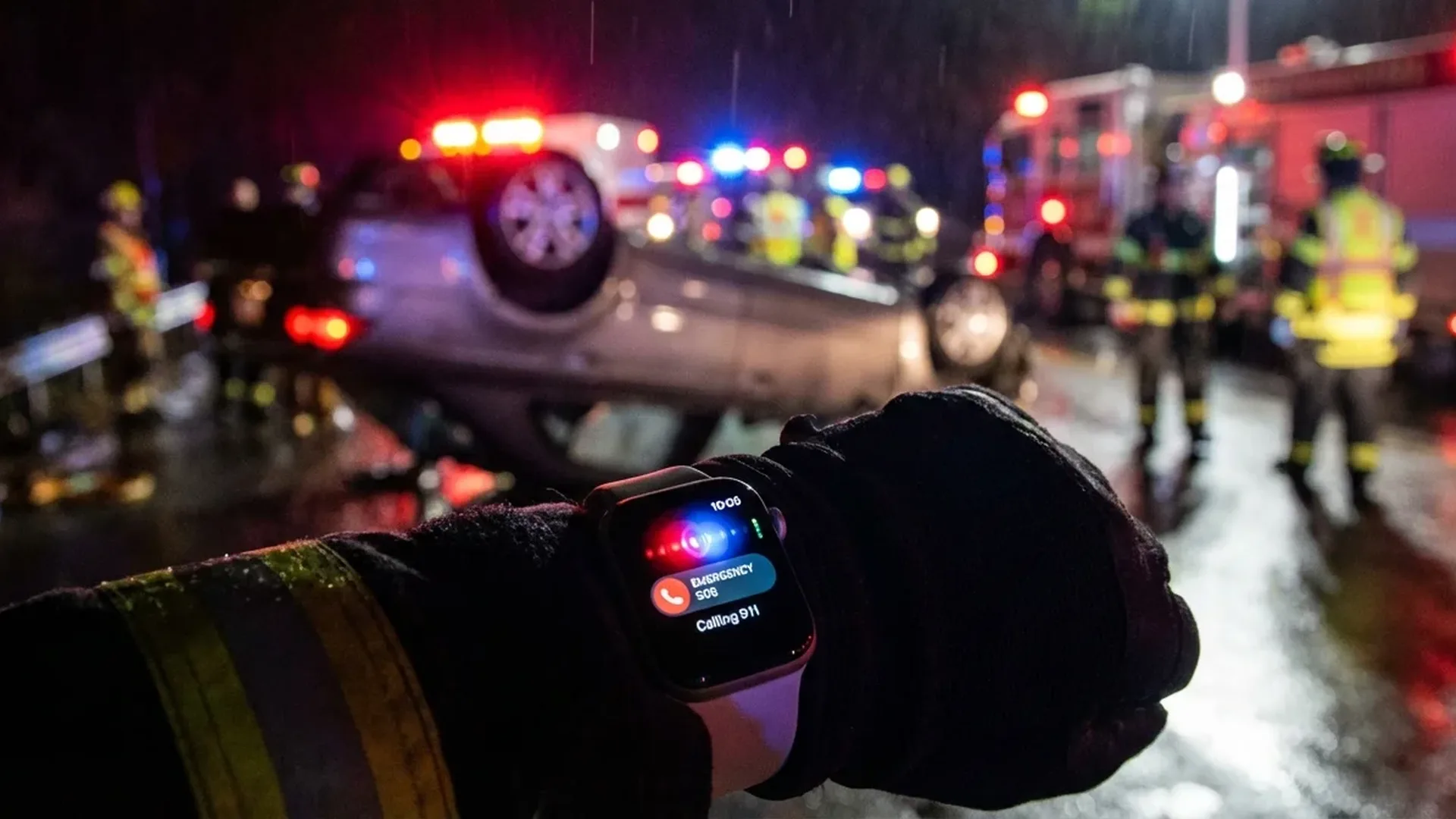
A terrifying car crash on a remote road. The driver unconscious. No other cars in sight. And suddenly, a small watch on their wrist automatically calls emergency services. This isn't a scene from a movie — it's reality thanks to Apple Watch Crash Detection. Since its launch in 2022, this feature has saved countless lives around the world, proving that the most important technology is the kind you hope you'll never need.
📖 Read more: Apple Watch Ultra 3: Is It Worth It After 3 Months of Use?
What Is Crash Detection
Crash Detection is an advanced safety feature introduced in September <2022 alongside the Apple Watch Series 8, Apple Watch Ultra, and Apple Watch SE (2nd generation). It uses a combination of cutting-edge sensors to automatically detect severe car crashes and alert emergency services if the wearer doesn't respond.
The technology behind this feature is remarkable. The Apple Watch uses a high-g accelerometer capable of measuring forces up to 256g — enough to detect even the most extreme impacts. Working alongside it is a next-generation gyroscope, a barometer for detecting pressure changes (such as airbag deployment), GPS for speed and location tracking, and a microphone to recognize the distinctive sound signature of a crash.
The system can recognize 4 types of severe vehicle crashes: front-impact collisions, side-impact collisions, rear-end collisions, and rollovers. Each type of accident produces unique data patterns, which Apple's machine learning algorithm has been trained to identify after millions of tests and real-world data points collected over several years of development.
How the Process Works
When a severe crash is detected, the Apple Watch initiates a 10-second countdown. During this time, it displays an alert on screen and produces a loud alarm sound. If the wearer is able to respond, they can dismiss the alert. If there's no response — because the user may be unconscious or incapacitated — the watch automatically calls emergency services and shares the real-time location with first responders.
Real Rescue Stories
Story 1: Mountain Road Accident
A young driver was traveling alone on a winding mountain road late at night. Due to slippery road conditions after heavy rain, he lost control of his vehicle and crashed into a rock face on the side of the road. The car ended up in a ravine, completely out of sight from the road above. The driver was semiconscious with multiple fractures and unable to reach his phone, which had been thrown from the vehicle on impact.
His Apple Watch Series 8 immediately detected the severe impact. After the 10-second countdown passed with no response, it automatically called 911. Thanks to the GPS coordinates transmitted by the watch, rescue teams were able to pinpoint his exact location and reach him in under 15 minutes. Doctors later stated that had help arrived any later, the outcome could have been far more serious due to internal bleeding.
Story 2: Cyclist Hit by a Car
In an urban area during the early morning hours, a cyclist was struck by a car running a red light at a busy intersection. The force of the impact threw him several meters, and he lost consciousness instantly without any chance to call for help. The driver of the car fled the scene, leaving the injured cyclist alone on the road in the pre-dawn darkness.
The Apple Watch Ultra on the cyclist's wrist detected the violent impact, recognizing the characteristic patterns of a serious crash. After the 10-second countdown elapsed without a response, it automatically called emergency services and transmitted the precise location. An ambulance arrived within minutes, and the cyclist was transported to the hospital with serious but non-life-threatening injuries. Without Crash Detection, he could have remained unconscious on a quiet street for an extended period before anyone discovered him.
Story 3: Winter Crash in a Remote Area
During a severe winter storm in the northern United States, a woman lost control of her car on a patch of black ice and plunged through a guardrail. The vehicle ended up 30 meters down an embankment, quickly becoming buried under accumulating snow. The area had absolutely no cellular coverage, making a traditional phone call impossible even if she had been able to reach her phone.
📖 Read more: Blood Sugar on Apple Watch: How Close Are We in 2026
This is where the true power of the Apple ecosystem became evident. The Apple Watch detected the crash and, working in conjunction with her iPhone 14 Pro in the vehicle, activated the Satellite SOS feature to send an emergency signal along with precise GPS coordinates to a relay center. Search and rescue teams located the snow-buried vehicle in less than an hour, saving the driver's life — she was already showing signs of hypothermia when they pulled her from the wreckage.
Story 4: Family Car Rollover on a Highway
A family of 4 was traveling on a highway when a tire blowout at high speed caused their SUV to roll over multiple times before coming to rest upside down on the shoulder. The driver and front passenger were in a state of shock, disoriented and unable to locate their phones inside the destroyed vehicle. The two children in the back seat were crying but secured by their car seats.
The Apple Watch SE (2nd generation) on the passenger's wrist instantly detected the rollover — one of the 4 crash types it's designed to recognize — and initiated the automatic emergency sequence. Within less than 2 minutes, emergency services had been notified with the exact GPS coordinates. Fire trucks and ambulances arrived swiftly, and the entire family was transported to the hospital in time. The attending physician later noted that the rapid response time was critical, as the driver had sustained injuries that required immediate surgical intervention.
Did You Know?
According to Apple, Crash Detection has assisted in thousands of real emergency situations since its launch. The technology continuously improves through software updates, learning from new real-world accident data to increase detection accuracy while simultaneously reducing false positives.
The Technology Behind Crash Detection
Apple spent years developing this feature, collecting data from millions of hours of real-world driving and hundreds of controlled crash simulations using professional crash test facilities. The machine learning algorithm was trained to distinguish between an actual crash and everyday activities that might produce similar sensor readings, achieving an impressive level of accuracy.
The sensors work in concert to paint a complete picture of any impact event:
- High-g accelerometer (up to 256g): Measures extreme deceleration forces during impact — far beyond what any normal activity would produce
- Gyroscope: Detects rapid changes in orientation, particularly useful for identifying rollovers and tumbling scenarios
- Barometer: Measures atmospheric pressure changes, such as those caused by airbag deployment inside the cabin
- GPS: Records speed and location in real-time, helping confirm vehicle involvement and providing rescue coordinates
- Microphone: Recognizes the distinctive sound signature of a crash, including glass breaking and metal impact
All of this data is combined in real-time by advanced fusion algorithms running on the Apple Watch's processor. The cross-validation between multiple sensors minimizes false positives while ensuring that real accidents are reliably detected regardless of the specific circumstances of the crash.
📖 Read more: Apple Watch Fall Detection Hit by ITC Patent Lawsuit
Settings and Compatibility
Enabling and managing Crash Detection is straightforward and takes only a few seconds:
How to Enable/Disable
- On Apple Watch: Settings → SOS → Crash Detection
- On iPhone: Watch App → My Watch → SOS → Crash Detection
- The feature is enabled by default on all compatible devices
Compatible Devices
- Apple Watch: Series 8 and later, SE (2nd generation), Ultra and later
- iPhone: iPhone 14 and later (for full satellite SOS functionality)
- Works even without an iPhone nearby, provided the Apple Watch has cellular connectivity
False Positives
Certain activities may occasionally trigger false activations. Roller coasters, extreme sports, and some high-impact physical activities can rarely mimic crash patterns in the sensor data. In these cases, you can take the following precautions:
- Temporarily disable the feature before the activity through Settings
- Quickly dismiss the countdown alert if it triggers accidentally
- Re-enable immediately after your activity is complete
What Happens After Detection
The sequence of actions following a crash detection event has been carefully designed to maximize the chances of a positive outcome:
- Crash detected: Sensors identify the characteristic patterns of a severe impact across multiple data streams
- Visual and audio alert: The watch displays a prominent on-screen alert and produces a loud alarm tone
- <10-second countdown: The user has a brief window to cancel if they're uninjured
- Automatic emergency call: If no response is detected within the countdown period
- Location sharing: GPS coordinates are transmitted in real-time to emergency dispatchers
- Emergency contacts notified: Your designated emergency contacts are automatically informed via text message with your location
If there's no cellular coverage available, iPhone 14 and later models can utilize Emergency SOS via Satellite, ensuring that help can arrive even in the most remote locations on Earth. This combination of terrestrial cellular and satellite communication technologies makes the system remarkably reliable in virtually every scenario, from urban intersections to remote mountain passes.
Frequently Asked Questions (FAQ)
Does Crash Detection work on motorcycles?
Yes, Crash Detection works on motorcycles and bicycles in addition to cars. The technology recognizes crash patterns regardless of the vehicle type, though it was originally optimized for passenger vehicle collisions. Apple has continued to refine the algorithms to improve detection across all vehicle categories through regular software updates.
Can it work without an iPhone nearby?
Yes, as long as the Apple Watch has a cellular connection. Without cellular capability, the watch needs to be paired with an iPhone or connected to Wi-Fi to place the call. However, crash detection itself always functions regardless of connectivity — the watch will attempt to call as soon as any connection becomes available.
What if it triggers by accident?
If Crash Detection activates without cause, you have 10 seconds to tap “I'm OK” on the screen to dismiss it. If the call does go through, you can explain the situation to the emergency dispatcher. False activations are rare thanks to the multiple sensor cross-validation system that requires matching patterns across all sensors simultaneously.
Does it work in all countries?
Crash detection itself works everywhere in the world. The automatic emergency call depends on local availability, but the system automatically knows the correct emergency number for each country (112 in Europe, 911 in the USA, etc.) and routes the call appropriately based on your current location.
Does the feature drain battery?
Energy consumption is minimal and virtually unnoticeable. The sensors operate in a very low-power standby mode during normal use and only activate fully when suspicious activity is detected that matches initial crash signatures. Apple has confirmed that Crash Detection does not noticeably affect daily battery life under normal usage conditions.