

📍 One of the most requested features in the Apple Watch world is now a reality: Precision Finding now works directly from your wrist. With the release of the 2nd generation AirTag in January 2026 and the watchOS 26.2.1 update, you can locate items with pinpoint accuracy without even needing your iPhone. In this comprehensive guide, we'll look at how the technology works, which devices are supported, and how to set it up step by step.
📖 Read more: Backup Apple Watch: Data Safety Guide
What Is Precision Finding?
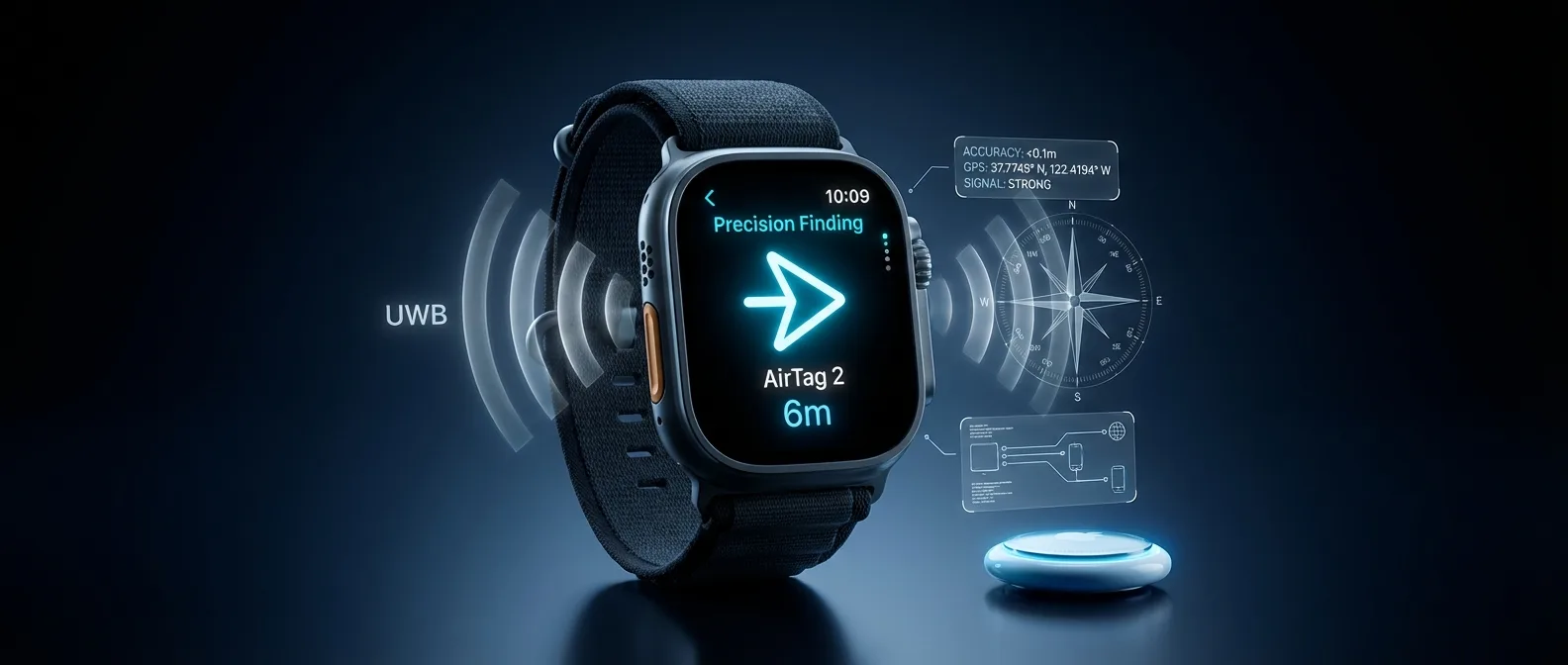
Precision Finding is Apple's most advanced item-tracking feature, designed to guide you step by step to your lost item. Unlike basic Bluetooth tracking — which only tells you if something is “nearby” — Precision Finding uses Ultra Wideband (UWB) technology to give you an exact distance in meters and a directional arrow in real time.
This technology relies on the U1 (first generation) or U2 (second generation) chip embedded in AirTags, along with corresponding UWB chips inside iPhone and — now — Apple Watch. UWB signals are transmitted at extremely high frequencies (6.5–8 GHz) with very low power, allowing distance measurement with centimeter-level accuracy.
UWB vs Bluetooth: Why Does It Matter?
📶 Bluetooth
- • Range: ~10-30 meters
- • Accuracy: ±2-5 meters
- • No directional guidance
- • Low power consumption
📡 Ultra Wideband
- • Accuracy: ±10 centimeters
- • Shows exact direction
- • Haptic + visual feedback
- • 1.5x greater range on AirTag 2
* The comparison refers to indoor item-tracking capabilities
AirTag 2nd Generation: What's New
On January 26, 2026, Apple announced the second-generation AirTag — nearly five years after the original launched in April 2021. Externally, the difference is virtually nonexistent — same size, same shape, same weight. The same accessories (cases, keychains) work perfectly with the new version. But internally, the upgraded components make a huge difference.
Precision Finding on Apple Watch: How It Works
Until now, if you wanted to use Precision Finding, you absolutely needed your iPhone. This was a significant drawback — especially if you had left your keys somewhere in the house but didn't know where your phone was.
With the 2nd generation AirTag and watchOS 26.2.1 (released January 26, 2026), that changes dramatically. The Apple Watch can now function independently as a Precision Finding device, showing directly on its screen:
Direction
A large arrow points exactly where your AirTag is
Distance
Precise distance in meters or feet in real time
Haptic Feedback
Vibrations intensify as you get closer
The experience on Apple Watch is impressively natural: you look at your wrist, see a large arrow and the distance (e.g., “6 meters to the left”), and simply follow. As you get closer, the vibrations on your watch become more frequent — like a “hot-cold” game on your wrist.
💡 Good to Know: If you leave your keys somewhere in the house, you no longer need your iPhone to find them. Raise your wrist, open Control Center on Apple Watch, tap your AirTag, and instantly see exactly where it is. It's the fastest way to locate items.
Which Devices Are Supported
Not all Apple Watches support Precision Finding. Apple has set specific requirements for both hardware and software:
Hardware
Software
Released: January 26, 2026
Required — doesn't work with 1st gen AirTag
For initial setup — then works independently
⚠️ Important: For improved Precision Finding on iPhone, you need iPhone Air or iPhone 15 or later (iPhone 16e excluded).
The reason at least Apple Watch Series 9 is required is that it was the first model with a second-generation Ultra Wideband chip (U2). Older models don't have the appropriate hardware to communicate via UWB with AirTag 2. It's worth noting that even Apple Watch SE — which costs less — is not supported, as it doesn't include a UWB chip at all.
Step-by-Step Setup Guide
Setting up Precision Finding on Apple Watch isn't done through the Find Items app — which may confuse some users. Instead, Apple uses Control Center as the access point. Follow these steps:
📖 Read more: Photos Face: Create Your Custom Watch Face
Open Control Center
Press the Side Button on your Apple Watch to open Control Center.
Scroll to the Bottom
Scroll down to the end of the icon list and tap "Edit".
Tap “Add” (+)
Tap the Add (+) button in the top-left corner to see available widgets.
Find “Find Items” → “Find AirTag”
Scroll until you find the Find Items category, and tap Find AirTag. Select which AirTag you want to add.
Done — Start Finding!
The AirTag will appear in Control Center with a custom icon (e.g., bag, keys). Tap it anytime to activate Precision Finding!
⚠️ Note: The Find Items app on Apple Watch can also locate AirTags, but without Precision Finding — meaning you'll only see if it's “nearby” or be able to play its sound. For full accuracy (arrow + distance), you need to use the Control Center method.
How UWB Communication Works Technically
Ultra Wideband technology may seem magical, but it's based on very specific physics principles. Let's see how it works:
🔬 Time of Flight (ToF) — The Basis of Precision Finding
UWB measures distance using the Time of Flight method: it emits extremely short pulsed signals (nanoseconds) and measures how long it takes for the response to arrive. Since radio waves travel at the speed of light, even the smallest delay translates into a precise distance.
📐 Angle of Arrival (AoA) — The Direction
Beyond distance, UWB uses multiple antennas to calculate the angle of arrival of the signal. This is what creates the “arrow” on screen — it knows exactly which direction the AirTag is in.
🔋 Low Power Consumption
UWB signals consume minimal energy. Apple has optimized the U2 chip so that Precision Finding doesn't significantly affect battery life of either the AirTag or the Apple Watch. Apple states that the AirTag 2 battery lasts over a year with normal use, including sound playback and Precision Finding.
5 Practical Use Cases
Let's look at five real-life situations where Precision Finding on Apple Watch makes a difference:
🔑 1. Keys Inside the House
You woke up, you're in a hurry, can't find your keys — and your iPhone is charging in the other room. Raise your wrist, tap Control Center, and see: “3 meters — behind the couch.”
🧳 2. Luggage at the Airport
Your suitcase appears on the carousel but you can't spot it among dozens of similar ones. With AirTag 2 and your Watch, you see exactly where it is — even when your hands are full. Apple now supports AirTag location sharing with over 50 airlines, including Delta, Lufthansa, Singapore Airlines, and United.
🚗 3. Where Did I Park?
In a huge shopping mall parking lot, an AirTag 2 in your car works wonders. Look at your watch and know exactly where to go — without pulling out your phone.
🏃 4. During a Run
You went jogging without your iPhone and need to find something (e.g., a waist pack) you left on the bench. Apple Watch Cellular + AirTag 2 has you fully covered.
👶 5. Kid's Backpack / School Bag
Put an AirTag 2 in the school bag and share it with your partner (up to 5 people). Both of you can locate its position within seconds.
Privacy and Anti-Stalking Protection
Apple faced harsh criticism after the launch of the original AirTag, as malicious users exploited the device for unwanted tracking of people. With AirTag 2, the company implements a series of enhanced safety measures:
🔄 Rotating Bluetooth IDs
The unique Bluetooth identifiers change frequently, making it much harder to detect and track.
📱 Cross-Platform Alerts
Both iPhone and Android smartphones alert you if an unknown AirTag is following you.
📖 Read more: Translate App: 20 Languages on Your Wrist
🔊 Louder Speaker
The 50% louder speaker makes it easier to detect a hidden AirTag — even if someone placed it intentionally.
🔒 End-to-End Encryption
Location data is encrypted end-to-end. Not even Apple knows where your AirTag is.
It's worth noting that, according to Apple, AirTag was designed exclusively for tracking items — not people or pets. If you want to track the location of people (e.g., children), Apple recommends using Family Sharing via Apple Watch or iPhone.
The Find My Network: Over 1 Billion Devices
Even if your AirTag isn't within Precision Finding range, you can locate its position through the Find My network — a massive network of over 1 billion iPhone, iPad, and Mac devices worldwide.
The AirTag emits a secure Bluetooth signal that's detected by nearby devices on the Find My network. These anonymously send the location to iCloud, and you see it on the map. The process is fully encrypted — the devices that “help” don't even know they've detected anything.
🌍 Find My + Airlines
Since December 2024, Apple introduced the Share Item Location feature — you can share a live tracking link for your AirTag with airlines to help locate lost luggage. Currently, over 50 airlines support this feature, with data showing a dramatic reduction in the number of lost bags.
Tips for Maximum Effectiveness
You can add multiple AirTags, each with its own icon — keys, bag, car, etc.
AirTag 2 uses a CR2032 battery that's easily replaceable. Your iPhone notifies you before it runs out. There are also third-party accessories (e.g., Elevation Lab TimeCapsule) that extend battery life to 5+ years.
You can share an AirTag with up to 5 people via iCloud. Ideal for house keys, car, or an umbrella that everyone uses.
AirTag 2 has IP67 certification — it withstands submersion in 1 meter of water for 30 minutes. Perfect if your keys fall in a puddle!
AirTag 2 features 85% recycled plastic in its casing and 100% fiber-based packaging, as part of Apple's carbon-neutral goal by 2030.
Is It Worth Upgrading from AirTag 1?
If you already have first-generation AirTags, the answer depends on your needs:
✅ YES, if...
- ⌚ You want Precision Finding on Apple Watch
- ⌚ You can't hear the AirTag sound in noisy environments
- ⌚ You're concerned about privacy & anti-stalking
- ⌚ You need greater tracking range
❌ NO, if...
- ⌚ Your AirTags work just fine
- ⌚ You only use Find My on iPhone
- ⌚ You don't have Apple Watch Series 9+
- ⌚ Their battery hasn't run out yet
On the bright side: the price remains the same — $29 individually or $99 for a 4-pack. And existing accessories (cases, keychains, leather holders) work perfectly with AirTag 2, since the size and shape are identical.
Final Thoughts
The addition of Precision Finding on Apple Watch is arguably the most significant upgrade that the 2nd generation AirTag brings. It transforms your watch into a complete tracking tool — independent from the iPhone — with centimeter-level accuracy, real-time direction, and haptic feedback.
Ultra Wideband technology continues to evolve, and we expect even more applications in the future — from automatic car unlocking to finding lost items at much greater range. If you have Apple Watch Series 9 or later, upgrading to AirTag 2 is definitely worth it.
📍 Precision Finding on Apple Watch
AirTag 2 + Apple Watch Series 9 or later + watchOS 26.2.1 = The fastest way to find whatever you lose. Without iPhone. Right from your wrist.