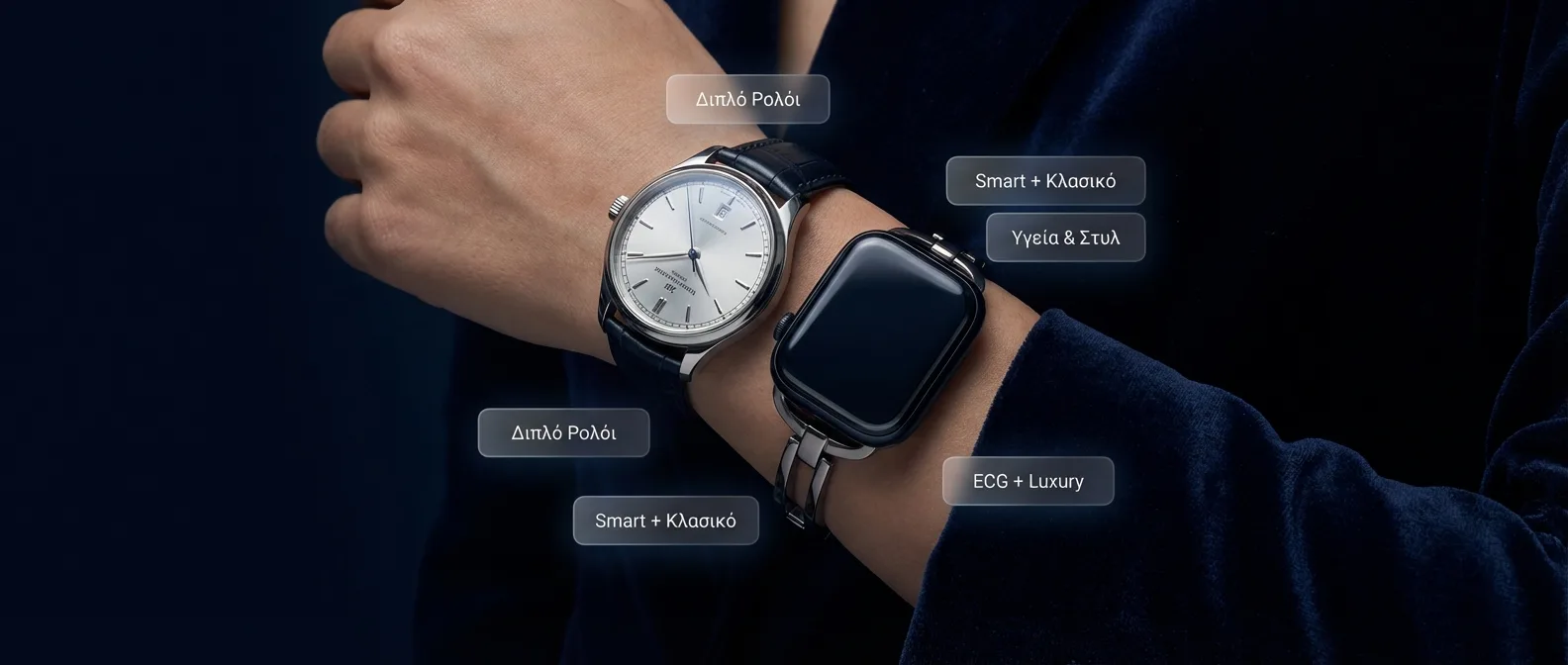
You love your Apple Watch for its health features, but you don't want to give up your classic mechanical watch? You're not alone. Thousands of horology enthusiasts face this dilemma. The solution? The Smartlet — a dual-band accessory that turns your Apple Watch into a bracelet, so you can wear both on the same wrist or on different hands.
📖 Read more: Blood Sugar on Apple Watch: How Close Are We in 2026
What is the Smartlet?
The word "Smartlet" comes from combining smart(watch) + brace(let). It's a category of accessories that transform the Apple Watch from a traditional watch form into a bracelet form. Instead of the Apple Watch sitting on top of the wrist (like a watch), it's placed sideways or on the side of the hand, leaving room for a classic watch.
The idea isn't as crazy as it sounds. Think about it:
- You want ECG, SpO2, high blood pressure alerts — but also an Omega Speedmaster on your wrist
- You want sleep tracking at night — but a dress watch during the day
- You want Apple Pay on one hand and a vintage Rolex on the other
- You want fitness tracking without looking like you're wearing a smartwatch
How it works technically
Smartlet dual-band accessories use various methods:
Rotating Mount
The Apple Watch case rotates 90° so the screen faces sideways, converting it into a bracelet. The heart rate sensor still touches the skin.
Upper Arm Band
Moves the Apple Watch higher on the arm (above the wrist), leaving room for a regular watch below. Uses an elastic band worn like an armband.
Integrated Band
An integrated strap that holds both the Apple Watch and a classic watch close together on the same wrist. The most unusual yet impressive solution.
Do the health sensors work?
This is the critical question. The Apple Watch uses PPG (photoplethysmography) technology — green and infrared LEDs that shine on the skin and measure reflected light. To work properly, it needs:
- Consistent contact with the skin — no air gaps
- Proper pressure — tight enough but not too much
- Correct position — ideally on top of the wrist, above the bones
⚠️ Important note: ECG requires touching the Digital Crown with your finger AND proper wrist placement. In smartlet/bracelet mode, taking an ECG is impossible. Similarly, the new high blood pressure alert on Series 11 needs stable pulse wave contact — it doesn't work in a sideways position. If these features matter to you, don't use a smartlet.
Popular Smartlet accessories (2026)
The market for Apple Watch dual-band accessories has grown significantly in recent years. Here are the most noteworthy options:
1. Swatch-style Cuff Adapter
Converts the Apple Watch into a cuff bracelet — worn on the inner wrist or higher up. Made from stainless steel or titanium. Price: €60-120. Suitable for Apple Watch 42mm/46mm. The heart rate sensor works, but less reliably.
2. Dual-Watch Nato Strap
An extremely original accessory: a NATO-style strap that holds two watches — the Apple Watch on one side and a classic watch (with 20-22mm lug width) on the other. Worn as a single bracelet. Price: €40-80. Ideal for a casual look, but quite wide — not suitable for thin wrists.
3. Magnetic Bracelet Adapter
Uses magnets to hold the Apple Watch in a bracelet position. Placed high on the forearm, leaving the wrist free. Lightweight, elastic, ideal for workouts. Price: €30-50. Downside: raise-to-wake and always-on don't work properly due to the angle.
4. Pocket Watch Adapter
Moving completely away from the wrist, this accessory turns the Apple Watch into a pocket watch! A metal case with a chain that clips to your belt or lapel. Health sensors don't work (no skin contact), but notifications, time, and Apple Pay (if you bring the case close to the terminal) work normally. Price: €25-60.
Who actually wears a smartlet?
It may seem niche, but the dual-wear community is bigger than you'd think:
- Watch collectors: Owners of Rolex, Omega, Patek Philippe who don't want to give up their watch but want health tracking. A common topic on r/Watches and Watchuseek forums.
- Professionals: In boardrooms and events, a mechanical watch signals style — but they want Apple Pay and notifications discreetly on the other hand.
- Athletes: During workouts they wear the Apple Watch (arm band), while in everyday life they wear a classic watch.
- Medical reasons: Users who need 24/7 heart monitoring but don't want a visible smartwatch — e.g., after an AFib diagnosis.
Pros and cons
Pros
- Wear your classic watch without losing health tracking
- Apple Pay + notifications always available
- Sleep tracking at night, dress watch during the day
- Fitness tracking (steps, calories) works in all positions
- Relatively affordable (€30-120)
Cons
- ECG doesn't work in sideways or upper arm position
- SpO2 and blood pressure unreliable
- Raise-to-wake may not work properly
- Can look aesthetically awkward
- Harder to interact with the screen
- Not an “official” use — Apple didn't design it for this
📖 Read more: Meta Smartwatch: A Threat to Apple Watch in 2026?
The alternative: Dual wrist (one on each hand)
Many users instead of a smartlet simply wear the Apple Watch on one hand and a regular watch on the other. This approach:
- Pro: All sensors work normally — ECG, SpO2, blood pressure, all good
- Pro: Apple supports switching wrists (Settings → General → Watch Orientation)
- Con: Two watches on two hands can look excessive
- Con: In a professional setting it may seem eccentric
💡 Pro Tip: If you wear the Apple Watch on your right hand, go to Settings → General → Watch Orientation and select "Right Wrist" and "Digital Crown on Left Side". This optimizes the raise-to-wake gesture and the sensor.
The “day/night” solution
The most practical approach followed by thousands of users:
📌 The Day/Night Routine
- Morning (7:00): Wear your classic watch for work/social life
- Gym: Switch to Apple Watch for workout tracking
- Evening (22:00): Wear the Apple Watch for sleep tracking, temperature, sleep insights
- Morning (7:00): Quick charge the Apple Watch (8 minutes fast charge = 8 hours of tracking)
With fast charging (Series 7+), 8 minutes on the charger = enough battery for 8 hours of sleep tracking. This means you don't need the watch all day — charge it in the shower or while getting ready.
Size guide: Which Apple Watch for a smartlet?
If you decide to use a smartlet, the size of the Apple Watch matters:
- Apple Watch SE 3 (40mm): The lightest (26.3g) and most elegant. Ideal for bracelet mode — doesn't look bulky. Lacks ECG (which doesn't work in smartlet mode anyway). Price: €279.
- Series 11 (42mm): Excellent balance of size and features. 29.7g. Small enough for a bracelet, large enough to read notifications. Price: €449.
- Series 11 (46mm): A bit large for bracelet mode — suits larger wrists (over 18cm). 36.9g.
- Ultra 3 (49mm): Too large and heavy (61.6g) for a smartlet — not recommended. Designed as a standalone watch.
What does Apple say?
Apple does not officially endorse the use of smartlet accessories and doesn't sell anything similar. In their documentation they state:
"For accurate health measurements, the Apple Watch should be worn on the top of the wrist, in snug but comfortable contact with the skin. The sensor on the back must touch the skin consistently."
This means Apple designed the sensors exclusively for the watch position on the wrist. Any other placement is considered off-label use — it partially works, but accuracy is not guaranteed.
Frequently Asked Questions (FAQ)
Does the Apple Watch get damaged in a smartlet?
It depends on the quality of the accessory. Cheap adapters can scratch the lugs (band attachment points). Choose adapters with an internal elastic lining or microfiber lining. Aluminum models scratch more easily — titanium ones hold up better.
Does Apple Pay work in bracelet mode?
Yes, as long as the Apple Watch screen is within 4cm of the NFC terminal. In bracelet mode the motion can be a bit trickier but it works. With an upper arm band, you need to bring your elbow close to the terminal — pretty awkward.
Can I use Siri in smartlet mode?
Yes — “Hey Siri” (or raise-to-speak) works regardless of position, as long as the microphone can hear properly. In bracelet mode, the microphone (located between the Digital Crown and Side Button) must not be covered.
Is it worth buying a smartlet?
If your main use is notifications, Apple Pay, fitness tracking (steps/calories), and sleep tracking, yes — a smartlet lets you wear a classic watch too. If you need ECG, SpO2, or blood pressure monitoring, don't buy one — these sensors don't work properly in an alternative position.
Final recommendation
The smartlet dual-band concept is a niche but functional solution to a real problem. The best approach depends on your needs:
- You want full health sensors: Wear the Apple Watch normally on one hand, classic watch on the other, or follow the day/night routine
- You want notifications + fitness: A rotating mount smartlet is ideal — cheap, practical, discreet
- You want maximum stealth: Upper arm band under a sleeve — nobody sees you're wearing a smartwatch
Whatever solution you choose, the important thing is to not give up on health tracking because you love your classic watch. The Apple Watch, even in bracelet mode, still tracks steps, calories, notifications, and sleep patterns — and that alone is worth it.