📸 What Is Center Stage?
Center Stage is a smart camera feature developed by Apple. It uses the ultrawide lens of the front camera combined with artificial intelligence algorithms to track your face (or multiple people's faces) and automatically adjust the framing in real time.
Think of it as having an invisible cameraman who follows you and makes sure you're always perfectly centered. The camera digitally crops from the wide-angle shot to create the ideal frame — without you lifting a finger.
🤖 How It Works on iPhone 17
On the iPhone 17, Apple has significantly upgraded Center Stage compared to the iPad versions. The 12MP ultrawide TrueDepth camera on the front of the device captures an exceptionally wide field of view. Then, the Neural Engine of the A19 Pro chip takes over:
- Face detection: Automatically detects all faces in the frame within milliseconds
- Motion tracking: Follows each face as it moves, with smooth transitions
- Dynamic crop: Adjusts zoom in/out based on the number of people
- Auto reframe: If someone enters or leaves the frame, the camera reacts instantly
💡 Important: Center Stage runs entirely on-device via the Neural Engine. No internet connection is needed and no facial data is sent to the cloud — full privacy protection.
🤳 Next-Generation Group Selfies
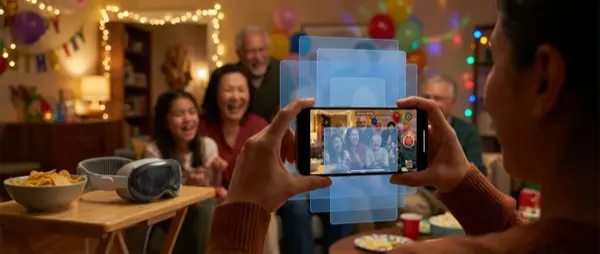
Where Center Stage truly shines is in group selfies. Forget the years of trying to fit 5 friends in one frame, stretching your arm out or using a selfie stick.
With iPhone 17, all you need to do is place the phone on a surface or set it on a tripod. Center Stage automatically recognizes who's in the shot, adjusts the zoom so everyone fits, and centers the group with perfect framing. If someone moves closer or farther away, the camera adjusts smoothly without any jarring cuts.
👥 Automatic Group Framing
Recognizes up to 10 faces simultaneously and positions them harmoniously in the frame, automatically adjusting the zoom level.
🏃 Motion Tracking
Smoothly follows faces even as they move, dance, or change positions — ideal for dynamic videos.
➕ Zoom In/Out
If a new person enters the frame, the camera automatically zooms out. If someone leaves, it zooms in for better detail.
🎬 Cinematic Transitions
Framing changes happen with smooth, cinematic transitions — no abrupt cuts or jerkiness.
📱 Using Center Stage with FaceTime & Video Calls
The most natural use of Center Stage is in video calls via FaceTime. If you're talking with friends or family and moving around the room — e.g. cooking, showing something, or just getting up for water — the camera follows you automatically.
This is especially useful in professional calls (Zoom, Microsoft Teams) where you want to maintain a professional appearance without worrying about your position in front of the camera. Center Stage ensures you're always properly centered.
Center Stage on iPhone 17 turns every video call into a professional experience. You no longer need to sit still in front of the camera.
🎵 TikTok, Instagram & Content Creation
If you create content for TikTok, Instagram Reels, or YouTube Shorts, Center Stage becomes your best assistant. You can dance, do tutorials, or showcase products, and the camera always keeps you centered.
This means you don't need a second person to film you. Simply set up the iPhone 17 on a tripod, start recording, and begin. The algorithm handles the rest — zoom, framing, tracking, all automatic.
⚙️ How to Enable / Disable Center Stage
Enabling and disabling Center Stage is very simple:
- Open an app that supports Center Stage (e.g. FaceTime, Zoom, Instagram)
- Activate the front camera
- Swipe down from the top-right corner to open the Control Center
- Tap the Video Effects icon
- Tap Center Stage to enable/disable
Alternatively, in some apps you can find the option directly in the camera settings within the app.
⚠️ Note: Center Stage only works with the front camera (TrueDepth). It is not available on the rear camera. Also, some third-party apps may not support it yet.
📊 Comparison: Center Stage on iPhone 17 vs iPad
Although the feature first appeared on iPads, the iPhone 17 version brings significant improvements:
iPhone 17 vs iPad — Center Stage
💡 Tips for the Best Results
To get the most out of Center Stage on iPhone 17, follow these tips:
- Good lighting: Make sure you have adequate lighting. A ring light works wonders for selfies and video calls
- Stable base: Use a tripod or phone stand for a steady shot without shaking
- Distance: Keep a distance of 0.5 – 3 meters from the camera for optimal tracking
- Background: A clean, uncluttered background helps the algorithm focus on faces
- Update iOS: Make sure you have the latest iOS version for the most recent Center Stage improvements
📲 Compatible Apps
Center Stage on iPhone 17 is supported by a wide range of apps, both from Apple and third parties:
🍎 Apple Apps
FaceTime — Full support with automatic framing
Camera app — Center Stage during video recording
Photo Booth — Fun group selfies
🌐 Third-Party Apps
Zoom — Professional video calls
Microsoft Teams — Corporate meetings
Instagram / TikTok — Content creation
WhatsApp / Viber — Video calls
🛒 Accessories for a Better Experience
To fully take advantage of Center Stage, certain accessories make a huge difference:
- Phone tripod: Place your iPhone 17 on a tripod for steady group selfies and video calls. You can sit or stand freely while the camera follows you
- Ring Light: An LED ring light provides even lighting on faces, dramatically improving image quality for selfies and video
- MagSafe desk stand: Ideal for video calls from your desk — keeps the iPhone at the perfect angle
- Bluetooth remote shutter: Take photos from a distance without touching the phone
🛍️ Tip: At OnOff.gr you'll find a wide range of iPhone 17 accessories — tripods, ring lights, MagSafe stands and much more at great prices. Upgrade your setup and make your selfies professional!
🔮 The Future of Center Stage
Apple continues to evolve Center Stage. According to reports, future iOS updates will bring:
- Gesture recognition: The algorithm will recognize hand gestures (e.g. “zoom in” with your hands)
- Background blur integration: Combining Center Stage with Portrait Mode for professional background blur
- Multi-device Center Stage: Collaboration between multiple Apple devices for multi-angle coverage
- AR effects: Augmented reality effects while using Center Stage
Center Stage on iPhone 17 represents a significant advancement in how we take photos, shoot videos, and make video calls. If you're looking for a phone that makes group selfies a breeze, the iPhone 17 with Center Stage is the ultimate choice.